Free Time Zone Meeting Planner – See Green Overlaps Instantly
Ad-free • No signup • Mobile-ready • Privacy-first
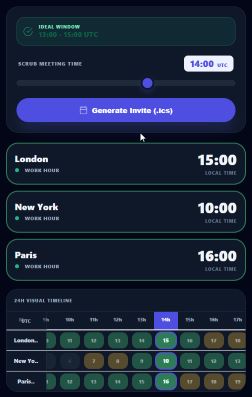
Enter up to 10 cities, pick duration—green slots mean everyone's awake and working. Export to Google/Outlook, share links. Zero hassle.
How to Use the MyTimeIs Time Zone Meeting Scheduler
- Enter your meeting participants’ cities (up to 10). Our smart search finds any time zone instantly.
- Choose your desired meeting duration and preferred time range.
- Watch the color-coded overlap grid update live — green = everyone’s business hours, yellow = partial overlap, red = no overlap.
- Click any green slot to generate a shareable link or export directly to Google Calendar / Outlook (.ics file).
- Done! No accounts, no ads, no tracking — your data stays private.


Why Teams Love Our Free Time Zone Meeting Planner
Unlike paid tools or clunky spreadsheets, MyTimeIs is built for speed and simplicity. Perfect for remote teams, international sales calls, distributed startups, and even family scheduling across continents.
Use Cases for Meeting Across Time Zones
- Remote & Hybrid Teams – Align global engineering, marketing, or support squads in seconds.
- International Sales & Client Calls – Never suggest a 3 a.m. meeting again.
- Global Product Launches & Webinars – Find the perfect slot for all regions.
- Freelancers & Agencies – Coordinate with clients in different continents effortlessly.
- Family & Friends Across Continents – Plan holiday calls or reunions without confusion.
Time Zone Meeting Scheduler vs Competitors
| Feature | MyTimeIs.com | World Time Buddy | TimeAndDate.com | Calendly |
|---|---|---|---|---|
| Free forever | ✅ Yes | ✅ Yes | ✅ Yes | ❌ Paid plans |
| No signup required | ✅ Yes | ✅ Yes | ✅ Yes | ❌ Required |
| Color-coded overlap (green = best) | ✅ Live | ✅ Basic | ❌ None | ❌ None |
| DST & timezone rules updated automatically | ✅ Yes | ✅ Yes | ✅ Yes | ✅ Yes |
| One-click .ics export | ✅ Yes | ❌ No | ❌ No | ✅ Yes (paid) |
| Shareable links | ✅ Yes | ✅ Yes | ❌ Limited | ✅ Yes |
| Zero tracking or ads | ✅ Yes | ❌ Some | ❌ Some | ❌ Yes |
Ready to Schedule Your Next Meeting Across Time Zones?
Try the tool above — it’s the fastest and most accurate free time zone meeting scheduler available.
Check out our other free tools: Flight Tracker and All Tools.
Why Teams Choose MyTimeIs Meeting Scheduler Over Paid Tools
Unlike Doodle, When2Meet or World Time Buddy premium versions, our tool is 100% free with no signup, no ads, and accurate time zone data powered by atomic clock synchronization. It auto-handles Daylight Saving Time (DST) changes and shows business hours in your local context (e.g., 9–5 in Auckland NZDT).
- Color-coded timeline: Green = ideal business hours, Yellow = evenings, Red = off-hours/sleep
- Instant best-overlap suggestions with ⭐ markers
- Share permanent links that save your locations & date
- Export selected times directly to .ics (Google Calendar, Outlook, Apple Calendar)
- Works offline after first load (progressive enhancement)
Frequently Asked Questions
How do I find the best time to schedule a meeting across time zones?
Use our free meeting scheduler to add 2-10 cities or time zones. The tool automatically highlights green 'good' hours (9 AM - 5 PM business hours) and shows the best overlap windows where most participants are available. Click any hour to see converted times across all locations.
What is the easiest way to plan international calls with different time zones?
Our time zone meeting planner makes it easy: add your team's cities, see a color-coded 24-hour timeline showing business hours (green), evenings (yellow), and sleep times (red). The tool automatically suggests the best meeting times with the longest overlap windows.
Is there a free tool to see time zone overlaps for Zoom or Google Meet?
Yes! Our meeting scheduler is completely free. Add your participants' cities, see instant time zone overlaps, and share a link with your team. You can also export the selected time as a .ics calendar file for Zoom, Google Meet, or any calendar app.
Does the tool automatically adjust for Daylight Saving Time?
Yes – it uses up-to-date IANA time zone rules and adjusts automatically for DST transitions worldwide.
Can I schedule meetings for future dates beyond one week?
Yes, use the date picker or navigation arrows to jump to any future date.
How many time zones can I compare at once?
Up to 10 cities/locations – perfect for global distributed teams.
Is my data saved or tracked?
No – everything stays in your browser. Saved sets use local storage only. No account required.
Does the Meeting Scheduler work on mobile devices?
Yes. The MyTimeIs Meeting Scheduler is fully mobile-responsive and optimized for touch interaction on smartphones and tablets.